

TD Toolkit: Build Your Own VJ Interface
Build a custom TouchDesigner performance interface!
Workshop led by BRANDON STARGRAVE
🗓️ Sunday, August 23rd, 2026 | 1pm - 3pm
📍 IRL @ dadaLab| Austin, TX
🎟️ $45 ($35 early bird, first 4 signups!)
🤖 One workshop session + opportunity to exhibit your work at dadaLab on September 25th, 2026!
💪 Level: INTERMEDIATE
Howdy, dadageeks 💙
We're glad you're here! dadageek is excited to offer this in-person workshop to the Austin, TX dadageek community. You can learn more about the workshop below. Feel free to reach out with any questions to kyle@dadageek.com
dadageek is a non-profit community of immersive artists and electronic musicians. Our mission is to offer education and community to those creating at the intersection of art, interactive media, and tech. Our community is filled with talented and creative technologists with a passion for sharing their expertise with others.
What is this workshop about?
Ready to take full control of your TouchDesigner performances? In this workshop, you'll build a custom VJ interface designed around your own creative workflow. Whether you're mixing generative visuals, video clips, camera feeds, or other media sources, you'll learn how to create a flexible performance system that allows you to switch, blend, and manipulate content in real time.
Along the way, we'll integrate audio reactivity, global visual effects, and performance controls that make your visuals more dynamic and expressive. We'll also explore different output configurations for live events and discuss optimization techniques that help keep your projects running smoothly in production environments.
Plus, all workshop participants will have the opportunity to show their work at the next dadageek Student Exhibition on September 25th, 2026!
What will I learn?
Students in this workshop will walk away knowing:
- How to create custom UI panels and control interfaces in TouchDesigner
- Techniques for smoothly switching and mixing between multiple visual sources
- Audio-reactive workflows and strategies for building responsive visual systems
- Best practices for optimizing TouchDesigner networks for live performance
- How to manage media loading and playback to avoid performance issues
- Methods for mapping controllers and performance hardware to your projects
- Video output workflows for a variety of live production setups, including multi-screen and projector installations
And of course, you'll leave with a fully functional custom TouchDesigner VJ interface that you can continue to expand, customize, and adapt to your own performances.
New to TouchDesigner?
This workshop is designed for intermediate users, but anyone with a basic understanding of navigating the TouchDesigner interface can follow along. You can learn the basics by working through the free TouchDesigner 100 series course found here: https://learn.derivative.ca/
TouchDesigner is a visual programming environment designed for artists and technologists exploring generative and interactive visual content creation. Embraced globally by artists, programmers, creative coders, software designers, and performers, TouchDesigner is the go-to tool for crafting immersive performances, large-scale installations, and interactive artworks that captivate and inspire.
Who is this course for?
This course is tailored for TouchDesigner users with intermediate-level experience. A general understanding of the TouchDesigner environment and familiarity with existing operator families is required.
Students who enroll in this course are:
TouchDesigner users looking to advance their capabilities,
technologists and programmers looking to explore creative approaches to tech,
musicians looking to add audio-reactive visuals to their music, and
anyone interested in the intersection of art, tech, and design!
What is the class like?
This workshop will meet at dadaLab; our headquarters in East Austin. The class is capped at 18 students so you will have plenty of opportunities to connect with your instructor and ask questions. Your fellow students in the class will be an eclectic mix of dadageeks from artists, musicians, programmers, and creative humans excited to learn, create, and connect!
Are there any requirements?
An introductory understanding of TouchDesigner
A Windows or Mac laptop
3-button mouse is recommended
A recent version of TouchDesigner (free download)
TouchDesigner can be downloaded here: https://derivative.ca/download
Meet your instructor!
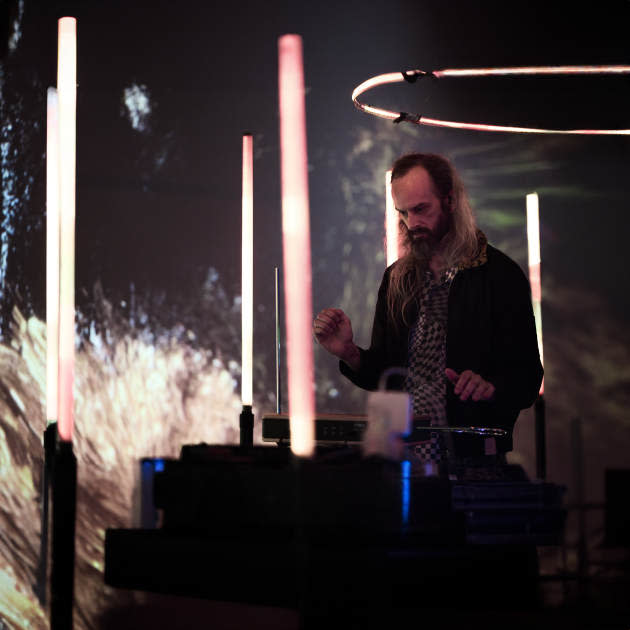
Brandon LeJeune (aka Stargrave) is a creative technologist focused on generative, interactive, and immersive audiovisual experiences. He builds deeply interconnected systems that meld hardware, software, and protocols into tangible expressions of art and technology. Brandon has extensive experience with laser technology, including serving as the lead laser technician for the national Pink Floyd Laser Spectacular tour. He is the Lab Manager for the Lab for Immersive Media (LIM) and an instructor in the Department of Arts and Entertainment Technologies at UT Austin. He also designs, develops, and engineers interactive installations with dadaLab.
University of Texas at Austin - Lab Manager, Lab for Immersive Media,
Department of Arts and Entertainment Technologies
https://designcreativetech.utexas.edu/lejeune-brandon
FYI
Refund Policy: Students can receive refunds up to 7 days before the class start date.
Class Minimums: If the class minimum has not been met, the class will be canceled or rescheduled. Those who have pre-paid will be notified in advance and will have the option to receive a class credit or a full refund.
Media Release: Please note that some events may be photographed or video recorded. Registering for this event hereby authorizes dadageek and Art Club to use said photos or videos on social media or in future promotional materials.
Location
dadaLab, 78722