How to plan and sell tickets for a Christmas event (timeline and checklist)
Whether you're still collecting Christmas event ideas or already have a date in the diary, the easiest way to plan and sell tickets is to pick a format that suits your space, work out how many people it holds, then count back from the day: tickets on sale around eight weeks out, and a sales check at four.


Christmas events have a lovely way of sneaking up on you: the venue is booked, the lights are ordered, and suddenly it's a few weeks before the big day and nobody has decided how many tickets to sell or when to put them on sale. A festive event happens once a year, on a fixed date and with a fixed capacity, so a little ticketing planning now saves a lot of stress later, and our page on how to sell tickets for Christmas events shows the features built for everything from grottos and light trails to markets and pantos.
Pick your Christmas event format
Christmas event ideas come in six main formats. Each one has a limit on how many people you can sell to, and a ticket type that suits the way people will buy, so it helps to know both before you plan anything else.
Christmas market or fair
A Christmas fair or fayre has two sets of buyers: stall holders, who pay for a pitch, and visitors, who pay for entry or a timed slot. Your limit is how many people the site can hold at once at its busiest hour rather than over the whole day, so a hall that holds 300 at a time could sell 300 tickets for each two-hour slot. That's why timed entry often suits smaller venues. For layouts and permissions, see our guide to planning a Christmas market for your local community.
Santa's grotto or festive experience
Santa grotto ideas run from a single chair in a tent to a full walk-through experience, and either way each family gets a short, fixed visit of around 10 to 15 minutes. That makes your limit the number of visits you can fit into the day. If Santa sees one family every 15 minutes between 10am and 4pm, that's 24 visits, and each visit is one time slot you sell. Time slot tickets fit naturally because families choose a time as well as a day, and our guide shows how to set up a Santa's grotto.

Panto, carol concert or show
For a panto, carol concert or show, your limit is simply the number of seats in the room. The decision is how buyers choose them. With reserved seating they pick their own seats, which suits a panto where some seats have a better view, and with general admission they buy a ticket and sit wherever they like, which suits a carol concert. Our ticket types guide compares both.
Party night or dinner
For a party night or dinner, your limit is how many guests you can seat, and guests usually book in groups. Selling a table of eight or ten as a single ticket keeps those orders simple. You can also offer a ticket that includes the meal alongside a cheaper entry-only ticket, so guests choose what they pay for.
Charity fundraiser
A fundraiser can use any of the formats above, so its limit is whatever that format allows. What changes is what you ask for: a donation option at checkout lets guests give on top of the ticket price, and UK charities can collect Gift Aid on eligible donations. If you're still choosing a format, our Christmas fundraiser ideas cover 23 of them.
Workshop or craft session
A workshop or craft session is limited by the number of workstations, such as 12 seats at a wreath-making table, so each session stays small. If you run the same session several times, set it up once as a recurring event and sell each date as its own session, so every date gets its own 12 places.
Christmas event countdown from 12 weeks out
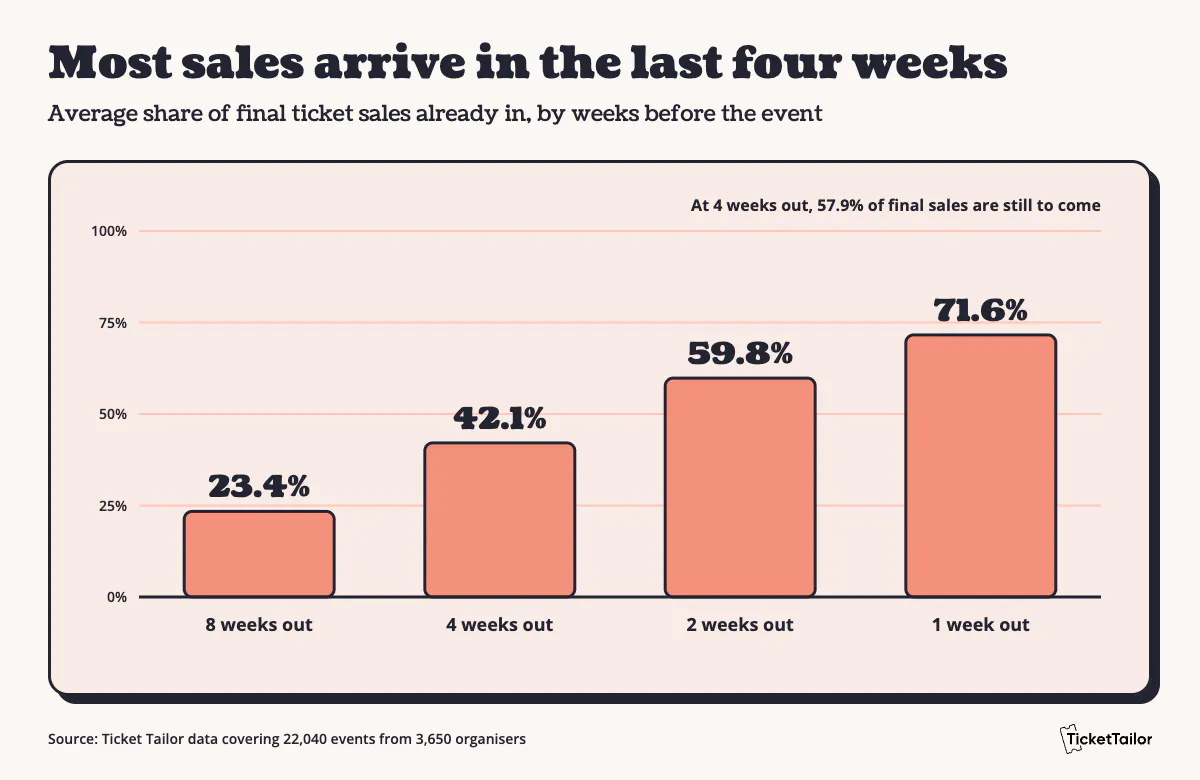
Christmas event planning works best backwards from the date. Our event planning checklist covers the wider side, from budget to run sheet, so this countdown sticks to ticketing. If sales look slow early on, that's normal: in our data, the average event had only 23.4% of its final sales in by 8 weeks out, and 57.9% of them arrived in the last four weeks. The countdown works whether you're finding out how to plan a Christmas party for 50 paying guests or a market for thousands, and if your event is less than 12 weeks away, start at the row that matches today and run the earlier tasks alongside it.
Weeks out
Planning
Ticketing
12
Format, venue, date, licences, budget
Capacity and ticket plan
8
Suppliers confirmed
Tickets on sale, early bird tier, announce to your list
6
Rota and volunteers drafted
Family, group and concession tickets open, products added
4
Mid-campaign review
Sales against capacity, partner discount code
2
Final supplier numbers
Reminder broadcast, waitlist on
Event week
Staff and volunteer briefing
Check-in app tested, door sales ready
Event day
Run sheet
Scan, door sales, capacity watch
12 weeks out
Settle the format, venue and date first, then check what you need from your local council. Permission for an outdoor site, an alcohol licence, a music licence and public liability insurance are common ones, though rules differ by country and council. With those in hand, work out capacity and a ticket plan: which ticket types, how many of each and when each one opens.
8 weeks out
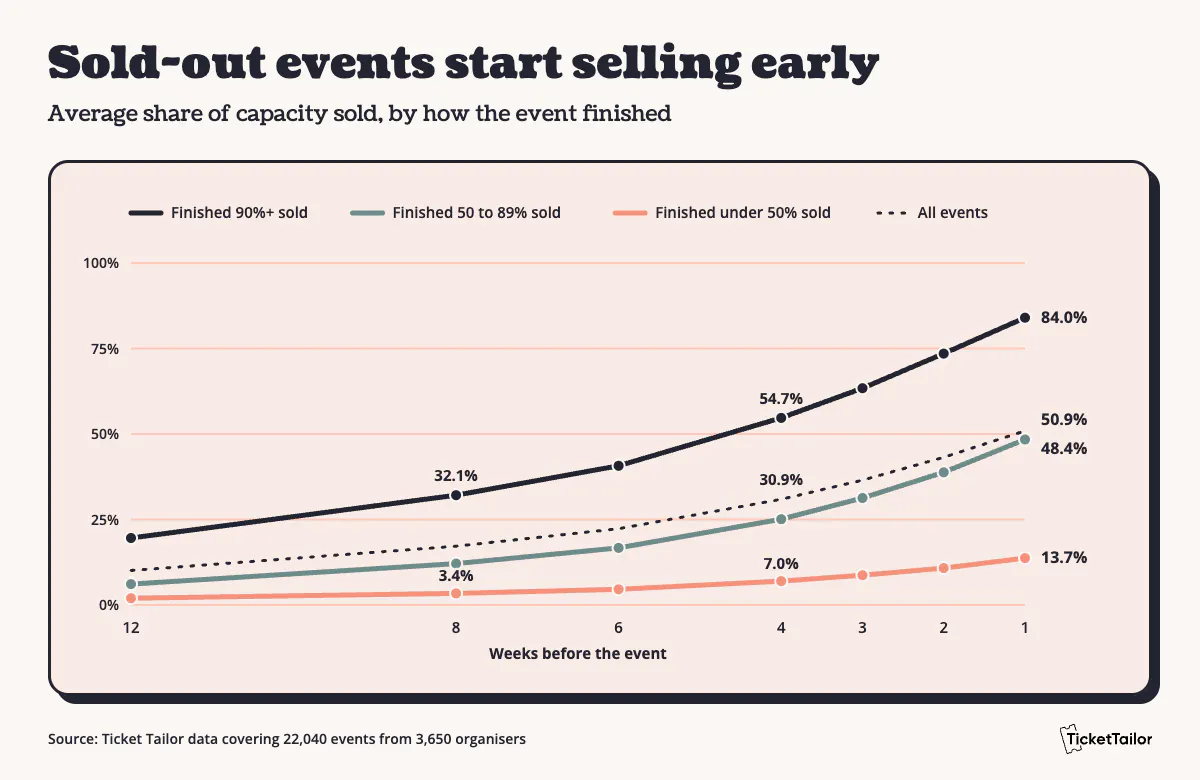
Put tickets on sale with an early bird tier, capped at a quantity you're happy to sell at the lower price, and tell your own list first. Early buyers also give you your first read on demand. It helps to give yourself the time, too: when we looked at 22,040 Christmas events, the average was on sale for 9.2 weeks, and the events that sold 90% or more were on sale for 10.8 weeks on average, against 7.8 weeks for those that sold under half. The early start matters too: by 8 weeks out, events that went on to sell 90% or more had already sold 32.1% of their capacity on average, while those that finished under half had reached just 3.4%.
6 weeks out
Open the family, group and concession tickets, and add any products you plan to sell alongside tickets, such as hot chocolate, photos or merchandise.
4 weeks out
Compare sales with your capacity plan. For a benchmark, the average event in our data had sold 30.9% of its capacity by this point, while events that went on to sell 90% or more were at 54.7% and those that finished under half were at 7.0%. If you're behind, a discount code for partners such as schools, choirs or local businesses gives them something to share. If you're ahead, check whether you can safely add capacity or a second session.
2 weeks out
Send a reminder to ticket holders, using the tools to email your attendees, covering arrival times, parking and what to bring. Turn on the waitlist so a sold-out slot still collects interest, and give suppliers your final numbers.
Event week
Brief staff and volunteers on entry, queues and who to call. Test the Check-in app on every device you'll use, and make sure whoever runs the door knows how door sales work.
Event day
Scan tickets, take door sales and watch capacity against each slot or session. If a time slot is running late, tell the next group before the queue builds.
Set capacity and plan your ticket types
How many tickets to release
Start from the space, then the session length. A grotto open from 10am to 4pm with 15-minute slots and one Santa has 24 slots a day, so if each holds one family of up to five, that's 120 people a day (an illustration only, so swap in your own numbers).
Then think about how much to release at once. When we spoke to Aryn Nakaoka back in December 2022 about her Christmas event, Show Aloha Land, she told us about the previous season: "we took a humongous loss because I think we expected too many people." The team had doubled the size of its drive-through to handle twice as many cars, "when I guess we'd already found the maximum demand." Releasing tickets in stages lets you see how many people actually want to come before you commit to more space or staff, and our guide to selling tickets in person suggests holding back 5% to 25% of tickets for the door.

Ticket types for Christmas events
Most Christmas events need three to five of these ticket types rather than all seven. Our guide to different types of event tickets explains each in more depth.
Ticket type
Best for
What to set up
Early bird
Your list and first buyers
A capped quantity at a lower price, before standard tickets open
Family
Two adults and children
A bundle at one price, issued as one ticket or individual tickets
Group
Parties, schools and clubs
A set number of tickets at a combined price
Students, over 60s and others who qualify
A lower price, stating who qualifies and whether proof is needed
VIP
Premium seats or extras
A limited quantity at a higher price
Time slot
Grottos, light trails and timed entry
One date and time per slot, with a capacity for each
Pay what you can
Community and charity events
Several price points, plus a donation option at checkout
Release tiers and pricing
Releasing tickets in tiers means the first buyers get the lowest price, and the price steps up as each tier sells out. That rewards people who commit early and protects your standard price. A common pattern is an early bird tier, a standard tier and a final release, and it may help to keep the early bird tier small so most tickets sell at the standard price. Our guide to ticket pricing strategies covers how to set each price, and the set-up steps below show how to build the tiers.
How sales differ by organiser type
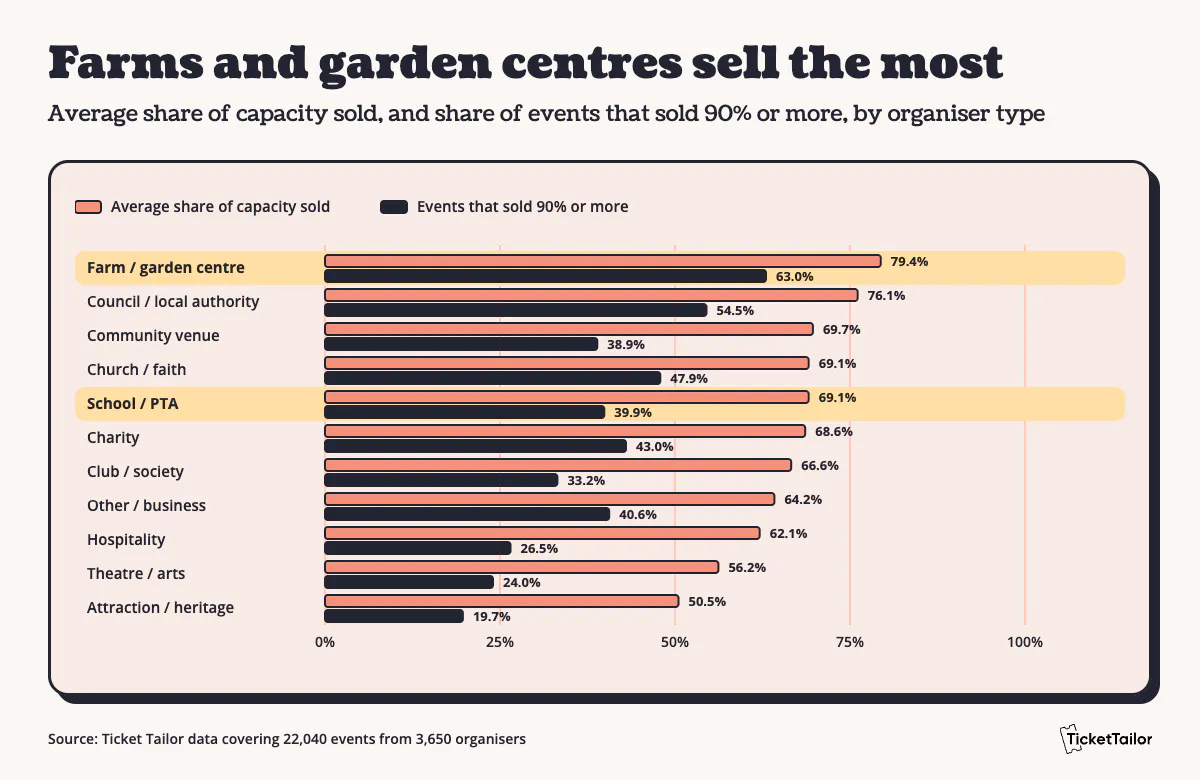
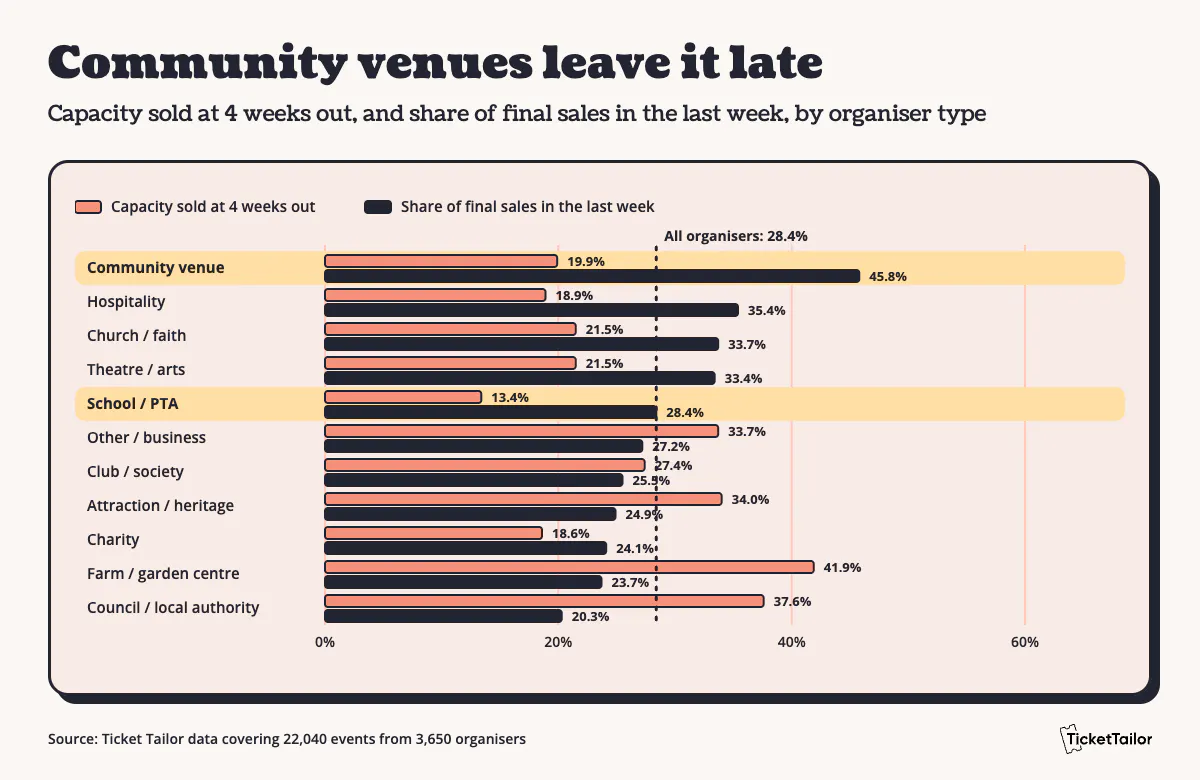
It helps to know what's typical before you set your numbers. In that same data, the average event sold 65.2% of its capacity and 40.1% sold 90% or more, but the picture changes depending on who's running the event. Farms and garden centres sold 79.4% on average across 1,783 events, with 63.0% of them selling 90% or more and about 10.5 weeks on sale. Schools and PTAs were on sale for just 4.2 weeks and had sold only 13.4% of their capacity at four weeks out, yet still finished at 69.1%. Community venues left it even later, taking 45.8% of their final sales in the last week, against 28.4% for all organisers.
Sell and promote your Christmas tickets
Where to announce your event
It usually makes sense to start with your own email list, then local groups, social media and event listings. Your list is the one audience you don't pay to reach again, and it carries over from year to year. As Gemma Martini of Martini Town in Canada says of us: "We also own our customer data which is important to us." For Show Aloha Land, that meant about 55,000 email addresses collected through their Ticket Tailor account over two years, with text and email reminders a week ahead, 24 hours ahead and the moment tickets went on sale. If you haven't built a list yet, our guide to email marketing for events is a good place to start. Before you post anywhere, give each channel its own referral tag so you can see which one sold the tickets.
Offers that suit festive events
Discount codes suit partners and past buyers, such as a school, a choir or last year's guests. Bundles suit families and groups, and you set a bundle's price directly because discount codes don't apply to bundles. Add-ons suit the extras: hot chocolate, photos with Santa, programmes or raffle tickets, all of which you can sell products alongside tickets. Name each discount code after the group it's for, such as SCHOOLS or CHOIR, so your redemption numbers show who responded.
Track what is selling
Referral tags give each channel its own link, and a QR code on posters or flyers does the same for print, so after a few weeks you can see whether the school newsletter outsold the Facebook group. The promote your event page covers how to create them, and reporting and analytics shows your sales as they come in. Compare them with your capacity plan every week from eight weeks out, and adjust the next message to match.
Run ticket sales and entry on the day
Check-in and scanning
The free Check-in app scans ticket QR codes with a phone camera on iOS or Android, works with external scanners and keeps going if you lose internet signal, which matters at a field or a farm. Several devices can check in at once, so you can open more scanning points as a queue builds. Amy LaBelle, whose LaBelle Lights display draws thousands of visitors each December, says: "We haven't had a single line. The check-in process is a breeze."
Door sales and Tap to Pay
Some people will always turn up without a ticket. Aryn told us Show Aloha Land took around 20 door sales a night, and its team gave people without tickets a QR code on a clipboard so they could buy on their phone before parking. If you'd rather sell tickets at the door, the same Check-in app takes card payments with Tap to Pay (powered by Stripe), so there's no extra hardware, and you can record cash sales in the app too. You'll need a Stripe account and a compatible phone.
Managing capacity and queues
Time slot ticketing spreads arrivals across the day instead of letting everyone turn up at once. Turn on the waitlist so people who miss out on a sold-out slot can register their interest, and show low availability on a slot that's filling up to nudge the last few sales.
After the event
Send a thank-you broadcast to everyone who came, with a photo or two and a line about what's next. Export your attendee and order data while it's fresh, because it's the start of next year's mailing list. Then consider opening an early bird tier for next year, as buyers who enjoyed this year's event may be your most receptive audience.
Christmas event ticketing checklist
Copy this Christmas party planning checklist into your own notes and adjust the dates to your event, or download the printable PDF version.
12 weeks out
- Format, venue and date confirmed
- Licences, permissions and insurance checked
- Capacity worked out from space and session length
- Ticket types, quantities and tiers decided
8 weeks out
- Event page live and tickets on sale
- Early bird tier capped and running
- List, local groups and social channels told
- Referral tag created for each channel
6 weeks out
- Family, group and concession tickets open
- Products and add-ons added
- Bundle prices set
- Payment plan assigned, if you're offering one
4 weeks out
- Sales checked against capacity
- Partner discount code shared
- Next announcement scheduled
2 weeks out
- Reminder broadcast sent
- Waitlist switched on
- Final numbers sent to suppliers
Event week
- Staff and volunteers briefed
- Check-in app tested on every device
- Door sales and Tap to Pay ready
Event day
- Scanning points staffed
- Door sales open
- Capacity and queues watched
After the event
- Thank-you broadcast sent
- Attendee and order data exported
- Early bird for next year planned
How to set this up in Ticket Tailor
Everything above can be built in one event, in the same order as the countdown. To see what's included for festive events first, start with sell tickets for Christmas events.
- Create your event. From your dashboard, go to 'Events' and 'Add new event'. For a grotto, light trail or anything with sessions, tick 'This is a recurring event', then add your slots on the 'Occurrences' page using 'Add repeating occurrences' and 'Add another time'. That's time slot ticketing in practice. Ticket types carry across every occurrence, and overrides let you change capacity for one date (recurring event guide).
- Add your ticket types. Create one for each row of the ticket type table. For slots, add a free parent ticket and make the attendee tickets dependent on it, so nobody can buy a ticket without securing a slot (ticket dependencies guide).
- Build your release tiers. Create a ticket type for each tier. On the later tiers, open 'Show advanced settings', tick 'Hide until another ticket type is running low', then choose the ticket it replaces and a buffer quantity (we suggest around 10). Set earlier tiers to 'Hide when sold out' so they disappear once they've gone (tiered pricing guide).
- Add bundles. In 'Edit event and tickets', go to 'Tickets and items' and click 'Add bundle'. Name it, such as 'Family pass', set the price and choose the ticket types inside. You can issue one ticket for the bundle or one per person (ticket bundle guide).
- Create discount codes. Go to 'Promote', then 'Discount codes' and 'Create discount code'. Name it, choose a fixed or percentage discount, add an expiry date or a limit on orders if you want one, then assign it to ticket types (discount code guide).
- Offer a payment plan. Spreading the cost can make a family day out much easier to say yes to, especially when you're buying tickets for four or five. In your Box office 'Settings', go to 'Payment plans' to create a plan, then assign it to your event (payment plans guide).
- Switch on the waitlist and schedule reminders. The waitlist is in the advanced event settings (waitlist guide), and email broadcasts let you send or schedule emails to groups of customers (email broadcast guide).
- Get ready for the door. Download the Check-in app to scan tickets. For door sales, set up a location in Stripe, set up Tap to Pay in Ticket Tailor and your Stripe account, then tick 'Allow user to place in-person orders' for each Check-in app user who'll take payments.