Ticket Tailor features every Event Creator should know about
From recurring events and Broadcasts to Products, waitlists and the Check-in app, here are the Ticket Tailor features that save time and help you sell more.
Ticket Tailor is packed with features designed to make selling tickets, managing orders and running your events easier.
And with new improvements launching all the time, there’s a good chance you’re not using everything available to you.
Maybe you’re rebuilding the same event each month when you could duplicate it. Or manually emailing attendees when Broadcasts could do the job. You might even be missing a simple feature that could help you squeeze a little more revenue out of each booking.
So, we’ve rounded up some Ticket Tailor features worth getting to know. We’ve also taken a trip through the archives to see how the platform has grown over the years.
Let’s get into it.
Features that can save you time
Event admin has a habit of piling up. These features can help take some repetitive jobs off your plate.
Recurring events and time slots
Run weekly classes, regular workshops, tours or an attraction with timed entry? Recurring events let you create repeating dates and time slots without setting up a separate event every time.
Your occurrences share the same main event details and ticket types, while you can manage individual dates and times when you need to. This can save a lot of repetitive setup when you’ve got a busy calendar.
Duplicate events
Running an event that’s pretty much the same as one you’ve done in the past?
Simply duplicate your previous event, update the details you need and you’re ready to go. You can copy both one-off and recurring events, so there’s no need to rebuild everything from scratch.
Give ticket buyers more control over their orders
Plans change. People book the wrong time. Confirmation emails disappear into inboxes.
Ticket Tailor’s self-serve tools can let ticket buyers view and resend tickets, reschedule eligible bookings and cancel orders, depending on the settings you choose.
This can reduce the number of routine requests landing with your team while still giving you control over your policies.
You can also manage orders yourself, including moving eligible bookings to another occurrence when somebody needs a different date or time.
Send updates with Broadcasts
Need to tell attendees about a last-minute entrance change? Send directions? Remind everyone what to bring?
Broadcasts let you contact your ticket buyers with event-specific updates from Ticket Tailor.
It’s a handy feature for the messages you need people to see before event day, without exporting a mailing list or moving between different tools.
Features that can help you sell more
Good ticketing can do so much more than simply process transactions. A few small tweaks can help increase spend, reward loyal customers and capture extra sales. Nice!
Create discount codes
Discount codes give you plenty of ways to get creative with your promotions.
You could run an early bird offer, reward returning attendees, create a family discount or share an exclusive code with a particular group.
You can also track usage, set limits and add conditions, giving you control over how each promotion works.
Sell Products alongside your tickets
T-shirts, drinks packages, guidebooks, meal vouchers, parking, experiences. If it makes sense alongside your event, there’s a good chance you can sell it as a Product.
Products can be sold during checkout or through your Ticket Tailor Store, giving people a chance to buy before, during or after your event.
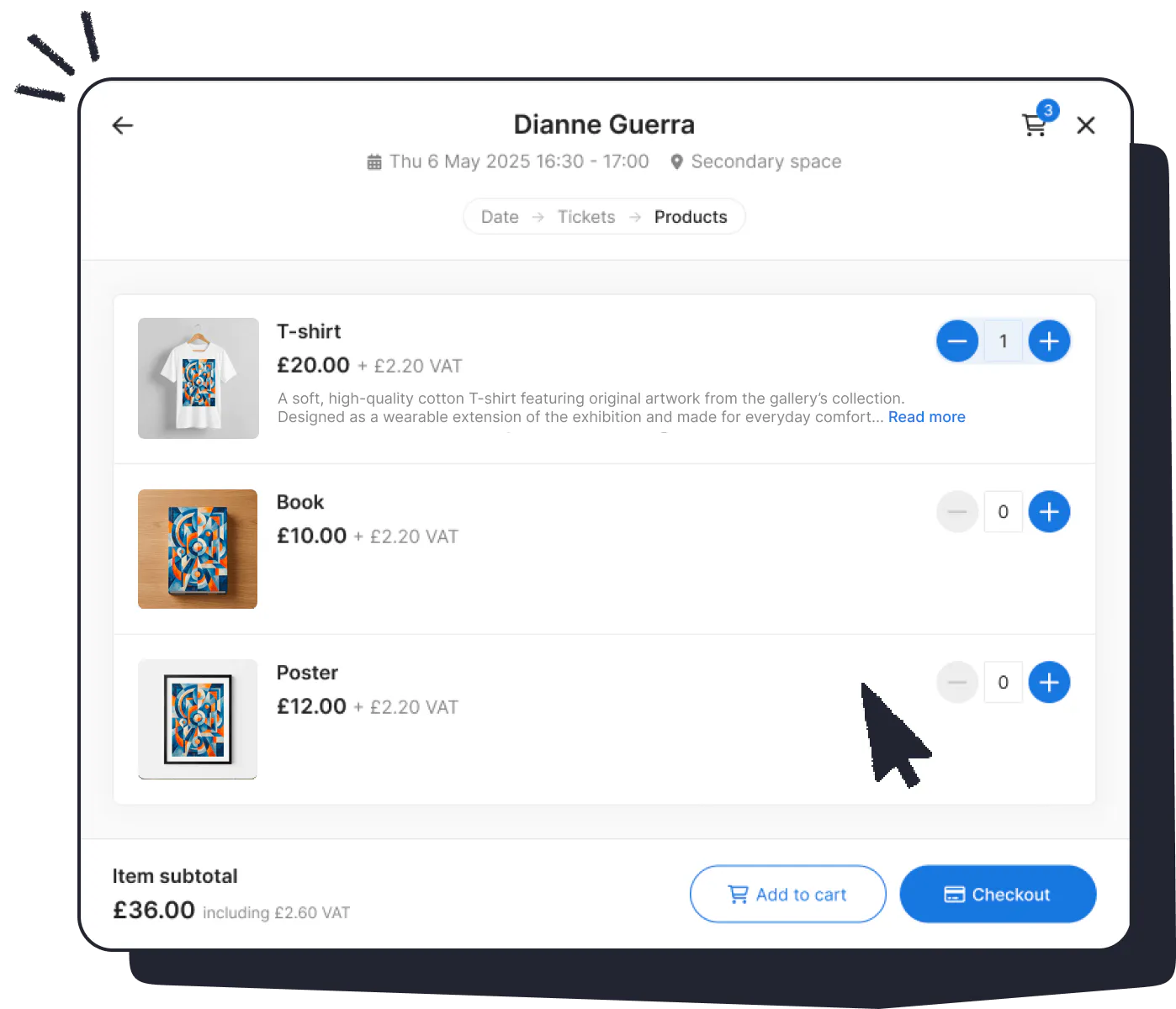
Not only does this make life easier for attendees, it can bring in more revenue upfront and help you get a better idea of demand before event day. Products can also be scanned through the Check-in app where relevant, which makes fulfilment easier too.
Sell gift vouchers
Gift vouchers let your biggest fans share your events with somebody else.
Once you’ve created your voucher, buyers can purchase it as a Product and receive a code automatically. You can customise the voucher and confirmation email to fit your brand too.
They’re useful for Christmas and birthdays, of course, but there’s no reason to keep them seasonal. Workshops, attractions, tours and experiences can sell them throughout the year.
Make paying easier
A smoother checkout gives people fewer reasons to abandon their basket.
Ticket Tailor supports options including Stripe Link, which can automatically fill saved payment details for eligible customers. You can also offer a Buy Now Pay Later option through PayPal Pay Later and Klarna.
And if people decide to join you at the last minute, you can sell tickets in person too.
Features that improve the ticket buyer experience
Some of the handiest Ticket Tailor features are small touches your attendees may appreciate without ever thinking about the tech behind them.
Give your Box Office your own look
Your ticket page is part of your event experience, so it should feel like you.
Ticket Tailor’s Box Office design tools let you customise themes, colours, fonts, photography and layouts without needing to code your own site.

This gives you a more joined-up journey from your marketing through to the moment somebody buys a ticket.
Help people remember the date
This little feature has been around for a while, and it’s still incredibly useful.
You can include an Add to calendar link in your event confirmation. Ticket buyers can then save the event to Google Calendar, Outlook, Yahoo Calendar or download an ICS file for other calendar apps.
A couple of clicks now could save somebody hunting through their inbox for the date three months later.
Set up a waitlist
A sell-out event is great news. A queue of people ready to buy any tickets that become available is even better!
Waitlists give interested buyers somewhere to register when tickets aren’t available. You can also use a waitlist before tickets go on sale to start gathering interest early.
Use reserved seating when your event calls for it
Running a theatre show, concert, conference or another seated event?
Reserved seating lets you create a seating chart and allow ticket buyers to select their preferred seats when booking. This can make things much easier for attendees and your team once the doors open.
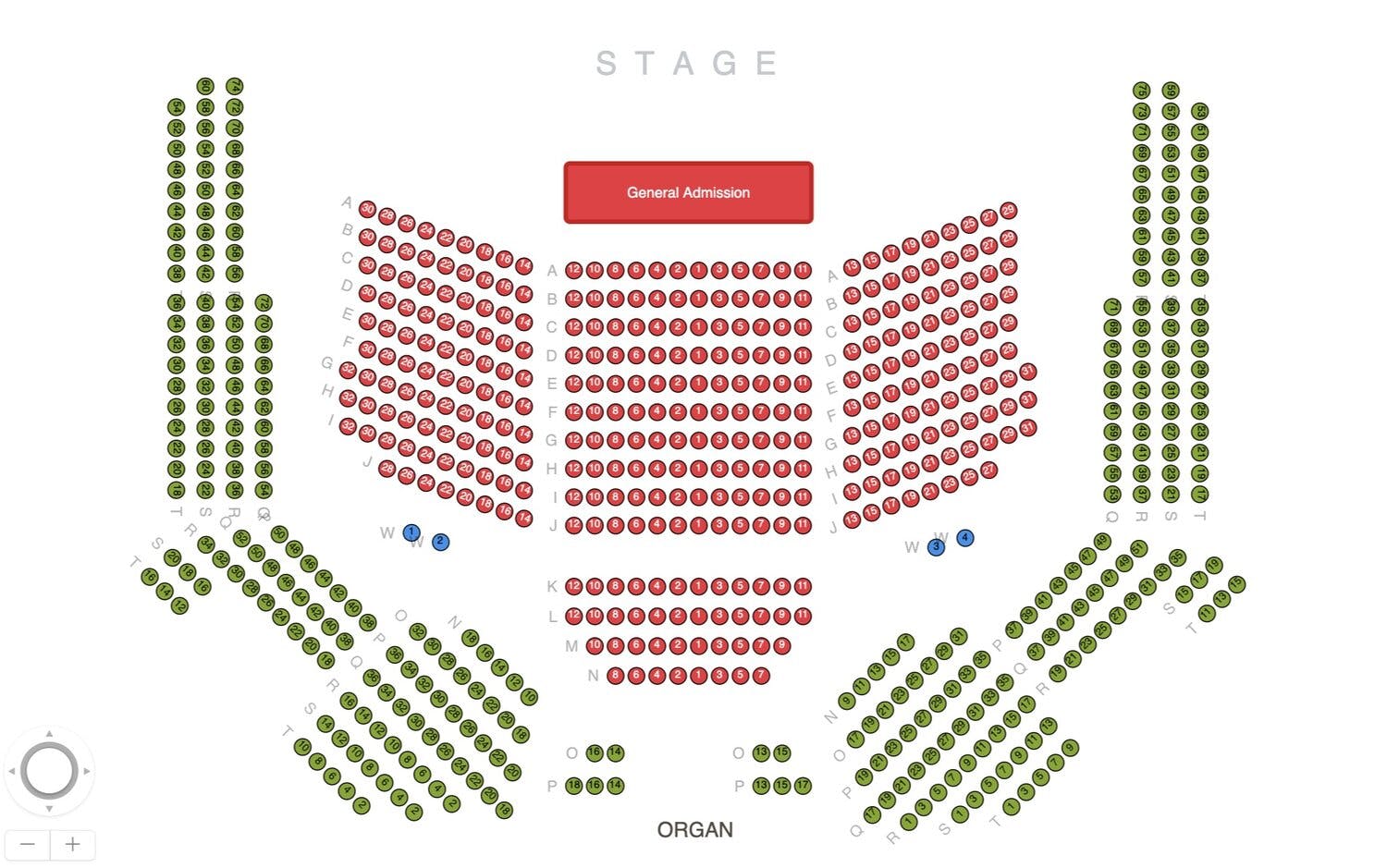
Hot tip: This feature can be used for more than just straightforward seating plans too! We’ve had festivals use it for pitch planning, and our customer support team has helped Event Creators design a whole range of unique solutions that make running their event so much easier.
👉 This is just one of the reasons why our speedy, 24/7 customer support comes in very handy for busy Event Creators!
Turn your marketing into a shortcut with QR codes
Ticket Tailor lets you generate QR codes that can take people straight to your ticketing page.
Add them to posters, flyers, signs or printed programmes and potential attendees can go from seeing your promotion to buying tickets on their phone.
Make event day easier with the Check-in app
Forget the days of printing doorlists or ripping paper tickets.
The free Ticket Tailor Check-in app lets your team scan tickets or search for attendees from a phone or tablet. You can use multiple devices, filter your doorlist and view check-in statistics as people arrive.

It can also work offline, which is particularly handy if your venue happens to be a remote field or anywhere else where the Wi-Fi has other ideas!
If you get lots of group bookings, you can check in multiple tickets from the same order together. Tickets and eligible Products can appear in the same check-in list too.
Use your data to understand what’s working
Ticket sales produce tons of useful information, and your reporting tools can help you make sense of it.
You can track issued tickets, look at sales by ticket type, explore trends over time and use filters to dig into the details.
This could help you see whether an early bird campaign worked, which dates are filling fastest or how much capacity you still have to sell.
Ticket Tailor has continued adding reporting tools over the years, including revenue reporting and more export options.
Connect Ticket Tailor with the tools you already use
Your ticketing platform doesn’t have to work in isolation.
Ticket Tailor integrates with tools that can help with marketing, CRM, automation and lots more.
You can use Zapier to connect Ticket Tailor with other apps and automate repetitive tasks. There are also integrations with platforms including HubSpot, Constant Contact, ActiveCampaign and Blackbaud Raiser’s Edge NXT.
If you regularly find yourself copying data from one system to another, it’s definitely worth checking whether an integration could take care of it.
A few more features worth exploring
There’s no shortage of other tools we could add to this list! You can accept Donations alongside ticket purchases, create Memberships and Season Passes, sell ticket bundles, set up different capacity rules and offer Refund Protection through XCover.
You can also dig deeper into checkout forms, custom domains, ticket dependencies and plenty more depending on the type of event you run.
Our advice? Have a browse around your Ticket Tailor dashboard every now and then. You might find something useful hiding in plain sight!
How Ticket Tailor has evolved over the years
We’ve added hundreds of features and improvements to our platform over the years, often in response to direct requests and suggestions from the Event Creator community that uses it.
Here’s a quick look at some of the releases that helped get us where we are today.
2020
In 2020, we introduced Add to calendar links, giving ticket buyers an easy way to save event details directly from their confirmation.
It’s a small feature that has stuck around for good reason.
2021
2021 brought improvements across recurring events, checkout, reporting and event management.
We introduced tools including Overrides for recurring events, ticket Holds, ticket imports and daily waitlists. We also made updates to our API, webhooks, check-in reporting and discount controls.
A lot was happening behind the scenes too, with a whole host of smaller changes designed to cut down on repetitive work.
2022
In 2022, we released 95 new and improved features!
Products arrived, giving Event Creators a way to sell more than tickets. We added ticket bundles, order transfers, internal notes on orders, custom domains and more capacity controls.
Stripe Link made checkout faster for eligible buyers, while improvements to vouchers opened up more options for gift cards and memberships.
This was also the year our public API officially launched.
2023
In 2023, we launched our new Check-in app, automated Gift vouchers and introduced Memberships and Season Passes. Event Creators also got a dedicated Store for Products and QR codes for promoting events.
Reporting tools improved too, alongside checkout forms and the experience of booking recurring events and time slots.
2024
Our product and tech teams launched more than 150 features and improvements during 2024.
Self-serve order management, bulk and partial refunds and group check-in gave Event Creators more ways to streamline admin.
Apple Wallet support, Klarna, ticket dependencies and accessibility improvements helped improve the buyer experience. We also added revenue reporting, new exports and more integrations with popular CRM tools.
Plus, 2024 saw us introduce a new dedicated home for our Product updates.
What’s new now?
We now share individual launches and improvements on our Product updates page, so you can see what’s new without waiting for an annual recap. Recent updates cover everything from checkout improvements to new integrations and resale tools.
Whether you’ve been using Ticket Tailor for years or you’ve just created your first event, it’s worth checking in from time to time.
There may be a feature waiting to save you a job, improve your attendees’ experience or help you get a little more from your next event. 😌